 I decided to give OpenSUSE 11 a try on my dedicated Linux box. Since I’ve only installed it and made some adjustments within Gnome, I thought I would give what I can really only call some first impressions of it. I’m writing this post from the OpenSUSE box. The system I installed it on is my few years old Gateway GX7022E – a Pentium D processor (3.0Ghz) with 3GB RAM.
I took the defaults during installation, choosing Gnome as the WM. I did briefly try both KDE 3.5 and 4.0 within VMs, but I am a bit more used to Gnome and tend to favor a more simple look (with some small creature comforts). I would definitely say that installation time is much shorter over my experience in the past installing OpenSUSE 10 and 10.1 (both were installed a while back on this same box). Call me old fashioned, but I also chose the more “traditional approach” of UNIX/Linux by not allowing automatic logins, or allowing the first user account created to be the administrator account (which does things using sudo in the background – in the same way Ubuntu does). This basically means that for any software I need to install, system changes, etc., I need to provide the root password (as opposed to my own, even though I am already logged into the system).
So now I’ve logged into Gnome and I’ve began my tweaks. OpenSUSE 11 comes with the “Main Menu”, aka SLAB 0.9.10, which is a one button menu. I ended up removing this in favor of the more typical menu bar (Applications, Places, System). Perhaps I will give SLAB another chance at some point, but for me anyway, having to click on “More Application” and having it open up a window with the apps to click seemed a little bit too much “Windows 3.1/NT 3.51” to me. I also changed themes to one I found on gnome-look.org, Ubex2; and the desktop background to one of Boston from the Charles River that I found on Interfacelift.com. Both these sites are great for Gnome tweaks and backgrounds.
I installed Screenlets as a desktop widget/sidebar app, and Cairo-dock as an app launcher similar to Objectdock (by Stardock) for Windows, or the Mac OS launcher. (As an aside, I’ve also been experimenting with setting my Windows system up similarly with the taskbar on top, and Objectdock on the bottom.) I also adjusted the font resolution to 96 dots per inch, and set for LCD, and medium hinting. This allows better font rendering in my opinion.
So first impressions are – fairly quick and easy install, but also an install that allows for more traditional approach to account logins, as well as some other options. I hope Ubuntu – another great distro – includes that option, for those that want it, in a future release. Then with some pretty easy customizations, I have a nice Gnome based environment to do my stuff in. The first screenshot is the default OpenSUSE, found on opensuse.org, and the second is mine, customized as I mentioned above. If you’re looking to try a different Linux distro, give this one a shot to see if it works for you.

Default OpenSUSE 11 Gnome Screenshot
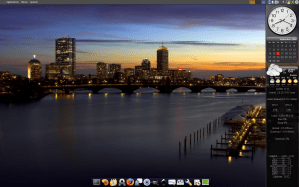
My Customized OpenSUSE 11 Screenshot
 So here we are now at the new location for The Science Attic. I’ve done some house cleaning, and hope going forward to refocus this blog just a bit. Some of the later entries not specifically related to tech or science will have a sort of “shelf life” and while important (to me anyway), will be removed after some time to basically keep the posts focused on tech and science.
 And did you know that a “leap second” was added in? Why? Well very slowly the Earth’s rotation is slowing, so a second was added to compensate. You can learn more details









 The Science Attic